
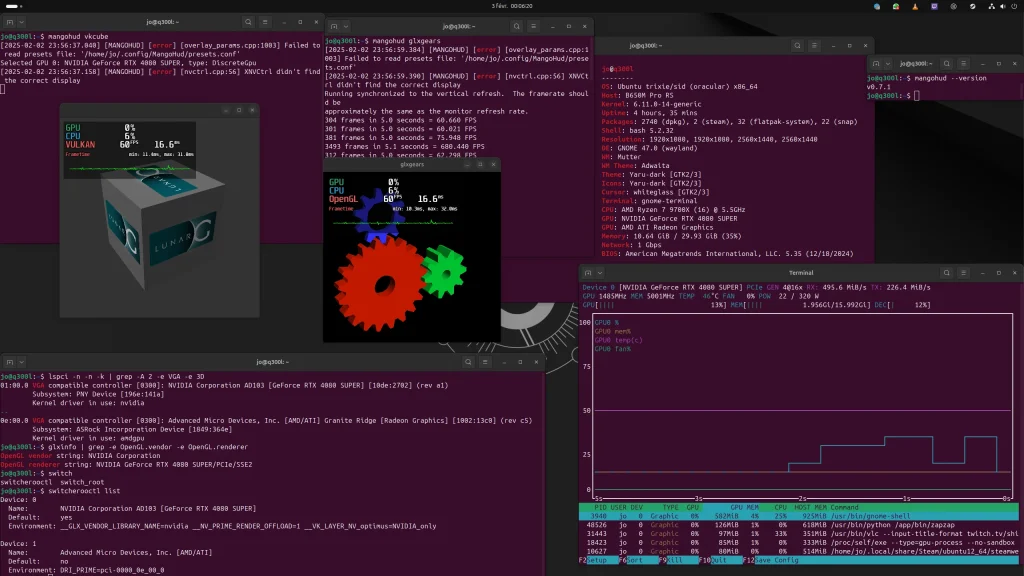
MangoHud is a widely-used performance overlay designed for Linux users who want real-time insights into system metrics such as FPS, CPU/GPU usage, temperatures, and memory consumption. Whether you’re a gamer, developer, or system performance enthusiast, MangoHud offers a versatile and informative HUD that enhances visibility into your system’s performance during runtime.
A common question among users is whether MangoHud works across all Linux distributions. The short answer is yes—MangoHud is compatible with most major distros including Ubuntu, Arch, Fedora, Debian, and others. Its flexible installation options ensure smooth integration regardless of your chosen Linux environment.
General Compatibility Overview
MangoHud is designed with broad Linux compatibility in mind, making it a reliable performance overlay for a wide variety of distributions. The software works seamlessly across most major Linux platforms, offering users real-time metrics such as frame rates, CPU and GPU usage, memory utilization, and thermal data. Its flexible architecture ensures that users can access these features regardless of the Linux distribution they prefer.
Whether the user is on a cutting-edge rolling release or a long-term support (LTS) version, MangoHud is typically available either through the official package repositories or via source builds. This adaptability makes it particularly attractive for users who rely on open-source tools to monitor and fine-tune system performance. From gaming to development, MangoHud ensures that detailed system data is readily accessible in a visually intuitive manner, improving both diagnostics and optimization processes.
Distribution-Specific Notes
While MangoHud supports a broad spectrum of Linux distributions, the methods of installation can vary depending on the package management system and repository availability of each distribution. Below are brief outlines for the installation processes in the most commonly used Linux environments:
Ubuntu/Debian
For Ubuntu and Debian-based systems, MangoHud can usually be installed via the Advanced Package Tool (APT). However, users should be aware that the default version available in official repositories might lag behind the latest release. To access newer versions, a Personal Package Archive (PPA) may be used. Manual updating may be necessary if the most recent features or bug fixes are required.
Arch Linux
Arch users benefit from MangoHud being included in the official repositories, which are typically updated more frequently. Installation is as simple as executing the command using pacman, Arch’s native package manager. This makes Arch one of the most straightforward platforms for installing MangoHud with minimal configuration or version control issues.
Fedora
Fedora users can install MangoHud through the DNF package manager. While the version available may not always be the most recent, it is generally reliable for standard use cases. Fedora’s strong support for modern open-source technologies ensures that MangoHud integrates well with the system’s libraries and driver configurations.
openSUSE
On openSUSE, MangoHud can be installed using the Zypper package manager. In addition to native repositories, users can also consider installing MangoHud through Flatpak, particularly if they are running versions of openSUSE where package availability or dependencies might be an issue. This dual-option approach gives users flexibility depending on their system setup and preferences.
Other Distributions
For users on less common distributions or those using custom or minimal Linux builds, MangoHud remains accessible via Flatpak or source compilation. Distributions like Gentoo, Void Linux, or Linux From Scratch can still support MangoHud with the appropriate build configuration and dependencies in place.
Flatpak and Universal Installation Options
MangoHud is also available through Flatpak, a universal package system designed to work across various Linux distributions. This format abstracts away many of the dependency issues that can arise with native package managers, making it an ideal option for users on unsupported or lesser-known distributions.
Flatpak packages include all necessary dependencies in a sandboxed environment, which greatly reduces the risk of version conflicts or broken libraries. This is particularly advantageous for users who want a plug-and-play experience without manually resolving compatibility issues. Flatpak also offers version consistency across different systems, ensuring that users get the same MangoHud experience regardless of their underlying operating system.
MangoHud is not typically distributed as an AppImage or Snap package, the versatility of Flatpak largely fills the need for a universal installation method. This approach aligns well with the goals of accessibility and cross-platform compatibility in the open-source ecosystem.
Source Code Flexibility
For advanced users, developers, or those on distributions not covered by the standard package managers, compiling MangoHud from source is a viable and often preferred option. This method allows for the latest features, highest degree of customization, and the ability to patch or fork the project for specialized use cases.
Building MangoHud from source requires a few prerequisites. First, users must have the Vulkan SDK installed, as MangoHud relies heavily on Vulkan for rendering overlays. Additionally, build tools such as Meson and Ninja are necessary for compiling the project. Common development libraries and headers must also be present, including those for OpenGL, X11, and optionally Wayland.
Version Considerations
A crucial aspect of MangoHud’s compatibility is version management. While most official package repositories offer stable versions of MangoHud, they may not always be up to date with the latest releases from the development team. This can be a limitation for users who require specific features, bug fixes, or performance improvements introduced in recent updates.
To overcome this limitation, users may consider installing MangoHud from a third-party repository, using Flatpak, or compiling from source. Each of these methods provides access to newer versions but comes with different levels of system integration and maintenance overhead.
It’s also worth noting that certain GPU drivers or Linux kernel versions may benefit from newer MangoHud releases. For example, support for newly released graphics cards or improved detection of temperature sensors may only be available in the latest version. Users aiming for optimal performance and hardware compatibility should prioritize version currency.
Conclusion
MangoHud offers extensive compatibility across nearly all Linux distributions, making it a highly accessible and flexible performance monitoring tool. Its presence in official repositories for major distributions like Ubuntu, Arch Linux, Fedora, and openSUSE ensures that the majority of users can install it with minimal effort.
For those on niche or custom distributions, MangoHud remains accessible through Flatpak or source compilation, both of which provide reliable alternatives to native package managers. These installation options ensure that MangoHud’s powerful performance monitoring capabilities are never out of reach, regardless of system architecture or package ecosystem.